
01 / START WITH THE WORK
Look for repeated handoff problems
This guide is for a small team that quotes catering events, gets customer approval and passes the agreed menu to a kitchen. You may be doing all three jobs yourself, or sharing them between office and kitchen staff.
A spreadsheet is a reasonable choice when your menu is straightforward, changes are occasional and someone reliably maintains the current quote and prep sheet. A clear file name, an approval record and a consistent handoff can be more useful than adopting software you will not maintain.
Software becomes worth evaluating when you keep encountering the same questions:
- Did the customer approve 40 guests or the later request for 60?
- Was the kitchen sheet updated from the approved quote or from an unapproved edit?
- Where is the earlier price and approval after someone changes the booking?
- Who has acknowledged the new plan, and what still needs preparing or packing?
- Does the invoice balance include the payment already received?
There is no universal number of bookings at which you need software. Choose based on the complexity of your changes and handoffs, and whether your team can follow the process consistently.
02 / BRING A BOOKING TO THE DEMO
Compare the workflow, not just the feature names
Ask to see one booking move through these steps. Use a sample that resembles your own menu and ask what happens when something changes.
- Menu-based quoting
- Can you price per guest, per item and fixed-price items as needed? Check quantities, delivery charges, discounts, tax and the requested deposit before sharing a quote.
- Guest-count changes and approval history
- Change the booking after approval. Can you still open the original document, see what was approved and keep the kitchen on that version until the replacement is approved?
- Customer approval links
- Preview what the customer sees. Confirm the link shows the intended revision, records approval against it and leaves internal costs and notes out of the customer document.
- Approved kitchen prep and packing
- Check the source of the kitchen quantities. Separate ingredient preparation from finished food and equipment packing. Ask how a newly approved revision resets the current checks while retaining earlier history.
- Office and kitchen responsibilities
- Review the same booking as office staff and kitchen staff. The kitchen needs approved instructions and quantities; it does not need customer prices or internal margins. Decide who maintains menus and who confirms the handoff.
- Invoices and payments
- Follow an approved quote into an invoice and its remaining balance. Distinguish recording an externally received payment from collecting a card payment. Check payment setup, fees and what happens if a payment needs review.
In CaterScale, owners manage business settings and team access, office staff work on bookings and quotes, and kitchen staff work from approved production information. Check that these roles suit your team before adopting it.
03 / CHOOSE THE RIGHT LEVEL OF STRUCTURE
Spreadsheets and CaterScale, side by side
Both approaches need accurate menus and someone responsible for the booking. The difference is how the approved version and the next handoff are maintained.
On a narrow screen, scroll the table sideways. Keyboard users can focus the table region and use the arrow keys.
| Task | Spreadsheet + documents | CaterScale |
|---|---|---|
| Build a quote | Maintain formulas, menu prices and document copies yourself. | Build event quotes from menu items with per-guest, each or fixed pricing. |
| Change an approved booking | Save the original, create a new version and record which one the customer approved. | Retain quote revisions and approval history. Pending changes leave the kitchen on the current approved plan. |
| Hand over to the kitchen | Copy approved quantities onto a prep sheet and confirm everyone has the current copy. | Use the approved production sheet with separate acknowledgment, prep and packing checks. |
| Track the balance | Reconcile the quote, invoice and received payments in your records. | Issue an invoice from the approved quote and track recorded payments against the event. Card collection needs Stripe setup. |
If manual copies are working well, use our free quote template and prep and packing checklist. They provide structure without an account. Your team remains responsible for calculations, version control and handoff.
Check the gaps as well as the fit
CaterScale’s kitchen workflow does not deduct stock, create purchasing orders, optimize delivery routes or track drivers by GPS. Marking a delivery Delivered does not automatically complete the event. If those are essential requirements, evaluate how you will handle them before choosing this workflow.
04 / A FICTIONAL BOOKING, REAL PRODUCT SCREENS
What happens when 40 guests becomes 60?
The Northwood team lunch is a fictional demonstration, not a customer result. These existing CaterScale screenshots show a sample booking moving from quote to approved kitchen plan. Catering amounts below are in CAD; they are not subscription prices.
Start with the approved 40-guest quote
Lemon herb chicken at CAD18 per guest, plus CAD5 delivery, totals CAD725. The customer approves revision 1. That is the kitchen’s working plan.
Request 60 guests without changing the kitchen’s approval
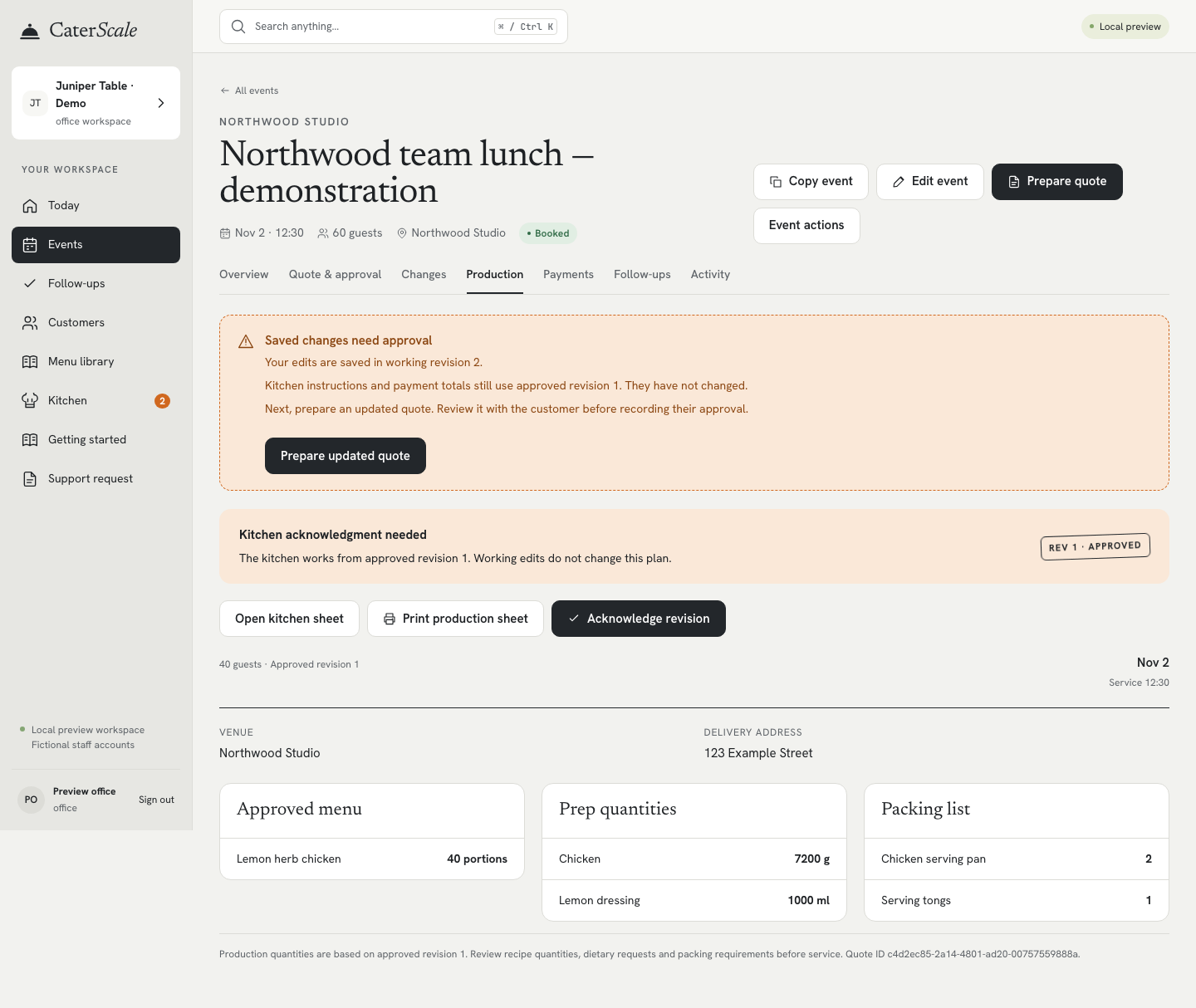
The office updates the booking. Until the replacement is approved, the production sheet still shows 40 portions from revision 1.
Approve the replacement and acknowledge it in the kitchen
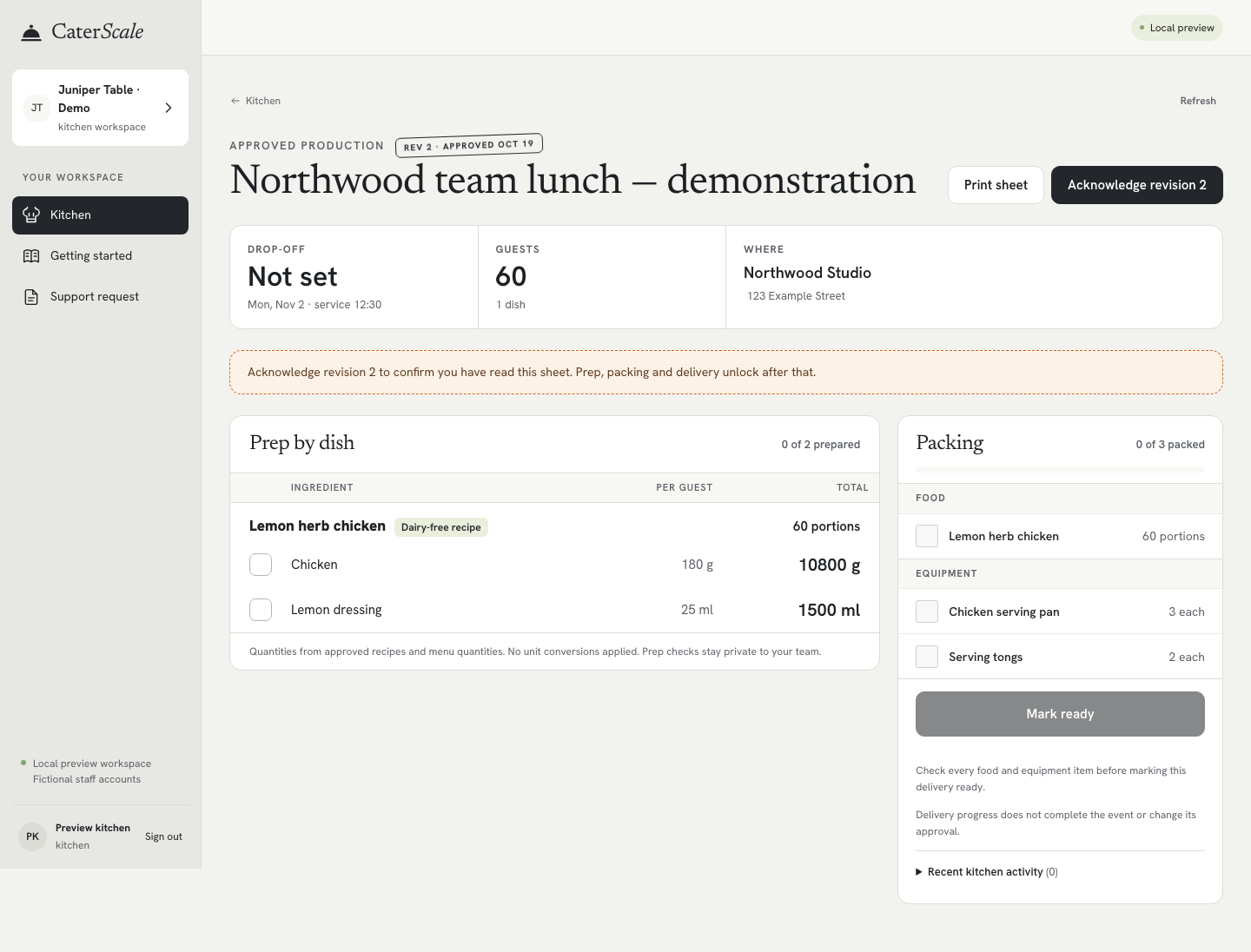
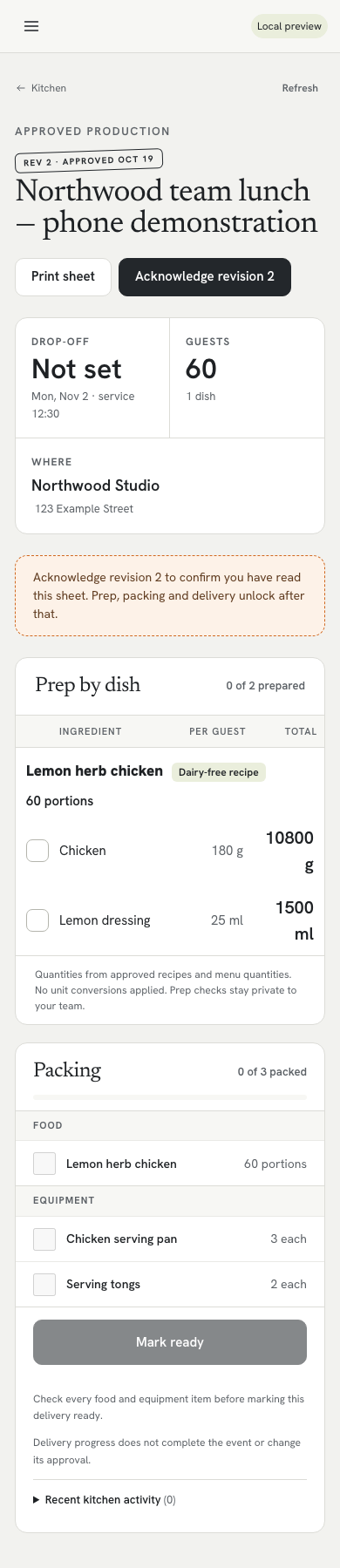
The 60-guest quote totals CAD1,085. After customer approval, revision 2 becomes the current plan; the original CAD725 approval remains in history. The kitchen then needs to acknowledge the new sheet and start fresh prep and packing checks.
Scroll inside the screenshot to see the full screen. Open full desktop revision screenshot · Open full phone revision screenshot

Scroll inside the screenshot to see the full screen. Open full desktop kitchen screenshot · Open full phone kitchen screenshot
05 / PLAN THE MOVE
Check these details before you commit
- Allow time to prepare your menu
- Set up your business profile, customers, menu prices, recipe quantities and packing items. A prep sheet is only as useful as the recipe and packing information you supply. Test a sample booking before relying on it for an event; there is no promised setup time.
- Know what you can import
- CaterScale supports customer and menu-item CSV imports, with column mapping and a preview before you select rows to create. Imports create new records; they do not update existing ones or migrate event, quote, invoice or payment history. Each file can contain up to 500 data rows and 128 KiB. Customer and menu exports are not a full workspace backup.
- Count people, not catering destinations
- The plan includes up to five team members and unlimited venues. Venues are the places you cater to; this does not include extra business workspaces. If you need a larger team or separate business workspaces, confirm a suitable arrangement before subscribing.
- Understand the bill
- CaterScale has a 14-day trial. Choose US$49/month, or US$479.88/year billed annually—equivalent to US$39.99/month. The annual option is one yearly charge, not a US$39.99 monthly payment. Review the billing terms in checkout before confirming a subscription.
- Confirm customer payment readiness
- Online card collection requires your catering business to connect Stripe and complete its payment-readiness requirements. Stripe processing fees apply. Customers enter card details on Stripe-hosted Checkout. An approved quote is not proof of payment; externally received payments are recorded separately.
For a practical fit check, write down any must-have workflow that is not shown here and ask for a demonstration of that exact step. Do not assume a feature name includes every process your business uses.
06 / MAKE THE DECISION WITH ONE BOOKING
Try the handoff before changing your whole process
During an evaluation, create a sample menu and quote, change the guest count, compare revisions and review the kitchen sheet. Check what each role can see and what your team must maintain. Use that result to decide whether the structure is worth adopting.
Starting with your first customers? Follow the first-booking setup guide for what to prepare and how to begin.
Up to five team members. Unlimited venues.
US$49/month, or US$39.99/month billed annually at US$479.88/year.